Skip to content

Module · switch on per organisation

Hours that reconcile, not hours that argue

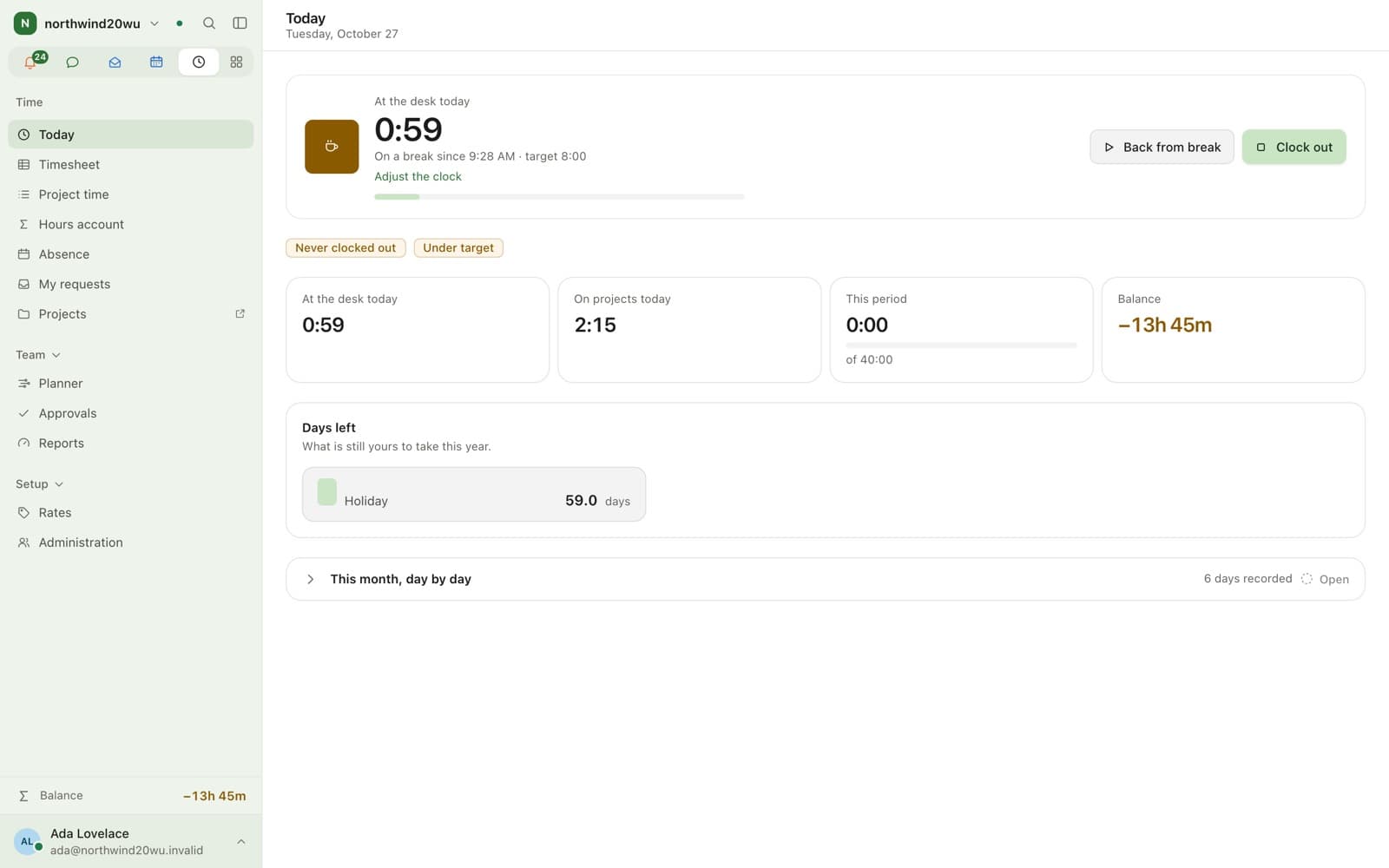
Enclessa Time records two different things and refuses to confuse them: presence, meaning when somebody was at work, and project time, meaning what the work was for. A schedule sets each day’s target and the difference accrues in an overtime ledger rather than evaporating. Periods are submitted, approved and then locked, absence draws on an entitlement ledger, and every timestamp comes from the server rather than from a device clock somebody can change.

Open betaThe platform is being built in the open, so parts of it are not there yet, behaviour changes between releases, and no availability figure is committed while it is in beta. What is still being built.

At a glance

Availability
Module, off by default
Attendance
Clock in and out with breaks and corrections
Project time
Customers, projects, activities, billable rates
Approval
Submit → approve → period lock
Absence
Entitlement ledger; sickness recorded, never diagnosed
Clock source
Server time only

What does Enclessa Time actually record?

Attendance and project time are separate, and the gap between them is information rather than an error. Somebody can be present for eight hours and book six to projects; that difference is visible instead of being quietly redistributed. Corrections supersede the original entry rather than overwriting it, so the record of what was changed survives.

  • Clock in and out, with breaks
  • Corrections supersede, never overwrite
  • Project time against customers, projects and activities with billable rates
  • A daily target from the schedule, with the difference accruing as a balance

How does approval work?

A period is submitted by the person, approved by whoever has that authority, and then locked so it stops moving underneath a payroll run or an invoice. Reopening a locked period is a deliberate act with a record, not a side effect of an edit.

  • Submit, approve, lock, with an explicit way back
  • Approvals queue for managers
  • Reports and asynchronous exports for finance

What does the planning surface show?

Four read models built for four different questions. A week board drawn by the minute for “what did this week look like”. An hours account that drills from year to month to ISO week to day for “where did the balance come from”. A read-only absence planner for “who is away when”. And a personal requests view for “what am I waiting on”.

  • Week board, drawn to the minute
  • Hours account: year → month → ISO week → day
  • Absence planner, read-only
  • My requests, in one place
  • A channel per project, created through the normal chat permissions

How is absence handled?

Holiday draws down an entitlement ledger, so a balance is the sum of what was granted and taken rather than a number somebody maintains by hand. Sickness is recorded as an absence and nothing more — there is no diagnosis field, because a collaboration platform has no business holding one.

  • Entitlement ledger for holiday
  • Sickness recorded without any medical detail
  • Absence visible to the people who plan around it, not to everyone

What this does not do

  • Time is off until an operator enables the module for the organisation.
  • There is no shift planning or rota: the planner shows absence and does not schedule staff.
  • Carry-over and expiry of entitlement and of overtime, and submission reminders, are designed and not yet built. The daily cap is applied to the balance; weekly limits, breaks, rest periods, night and Sunday work are flagged on the day rather than enforced.
  • There is no productivity scoring and no ranking of people by output. That is a deliberate refusal.
  • Introducing time recording is the employer’s decision and the employer’s responsibility. Where a works council exists, a system that records working time is generally subject to its co-determination under § 87 (1) no. 6 BetrVG, and a works agreement (Betriebsvereinbarung) may be needed before it goes live. Enclessa is the tool; it does not make that assessment for you.

Related

Where this shows up

Questions

Time tracking: common questions

Does Enclessa include time tracking?

Yes, as an optional module. Enclessa Time records attendance with breaks, project time against customers and projects, timesheets that are submitted and approved, absence against an entitlement ledger and an overtime balance.

Can employees edit their own recorded time?

They can file a correction, which supersedes the original entry rather than replacing it, so both the original and the change remain visible. Once a period is approved and locked it stops moving until it is explicitly reopened.

Does Enclessa Time store sickness reasons?

No. Sickness is recorded as an absence with no diagnosis field. A collaboration platform has no business holding medical detail, so there is nowhere to put it.

Does Enclessa do shift planning?

No. The absence planner shows who is away and when; it does not schedule shifts or rotas, and that is a deliberate scope decision rather than a gap waiting to be filled.

Encrypted collaboration, hosted in Europe.

Create a workspace in a couple of minutes. It is yours at your-team.enclessa.app, hosted in the European Union, with encrypted direct messages from the first one you send.

Open beta. Free plan, no payment card to start.